Monthly Marketing Message Training Call #13 Facebook Events
Peter Brissette • October 13, 2020

All right. Welcome. I want to go over a couple of things here. Welcome to the monthly marketing message. Peter Brissette here, digital marketing dude, and we're doing our coaching training call. A question that I had come up was, one of many questions, was Facebook events. So if your Facebook hasn't changed yet... Probably has. Oh, if you like, you can temporarily switch to the classic Facebook. Wow. Look at that. This is the new version of what it looks like. It's kind of annoying, but thank you, Facebook for... Always changes things. But wanted to talk about events.
So I had a couple of folks ask about ways to promote their events that they were having. And it's like, well, we got a great way. It's called Facebook Events. And so if you go to your Facebook page, it should have these options here on the left, and you can go into events, and see your past events down here. And then of course you can create an event. So is this an in-person event or an online event? You get to choose. So let's say this is an online event, and... Yeah.
All right, here we go. So we're just going to say our monthly marketing message training coaching call. And let's say that was going to be today at 11:30. I don't think you have to have an end time. Location is if you're doing a location. It's public. Our monthly training call. And category. So we'll call this... What will we call this? Call this other. Okay. And we'll go next.
Location. And we're going to do Facebook Live, so you can schedule on Facebook Live. External link or other. So you could put other instructions, or if you're going to link to something. So it could be a Zoom link, for instance. So let's see here if we can... Get to our Zoom link.
Whatever. We're just going to do this. Zoom.us. And click next.
Then you can do a cover photo. So your cover photo... I'm not sure the exact size of the cover photo, but normally... Let's see here what we can do. I want to go to... Let's go to... This is taking me too long. Let's see if I can get something here. How about operations? Presentations?
Let's see. Just trying to find a good size. [inaudible 00:04:24] here. Here we go. Nope, that's in there. Let's see if we can get one out of Facebook one-on-one. This is probably... Well, it's a postcard size. [inaudible 00:04:58] print. Here we go.
So, not great image there, but you can play with that. I always recommend canva.com for creating graphics for your socials, so you can easily find templates for Facebook events. So here's your Facebook event cover, so 1920 by 1080 pixels on this one, it shows. So you can do that. That's a bonus for you.
And that's it. So then you can create the event. You can also preview this, desktop or mobile. So here's your event. And then what you're able to do is actually boost the event. And then you're able to get some insights on that. So if I wanted to boost this, I could decide... So the content's already there, it's not a special category. So then I can choose my audience. So do I want to do this locally? Do I want to do it all over the country? So you get to dig in here to exactly age groups, men, women, radius, distance, and then this will give you an idea how many people are potentially in reach. And then you can always dig into more detailed targeting inside the ads manager as well.
And then set your number of days. He wants this to run for five days. End date, so we got that.
Oh, well. The date is today of the event. So the event would have to be in the future. So we'd have to change that. Then you could set the number of days, you could set the budget, how much do you want to spend. That'll give you an idea how many reached per day. And then if you're using your Facebook tracking pixel as well, which is just the tracking code for that.
So that's basically it. Just wanted to give you a quick overview of Facebook events. Hopefully you found that helpful. If you have questions about that, and more details, be happy to answer those. So you can ask those wherever you see this video. That's all for me today. We'll see you next month.
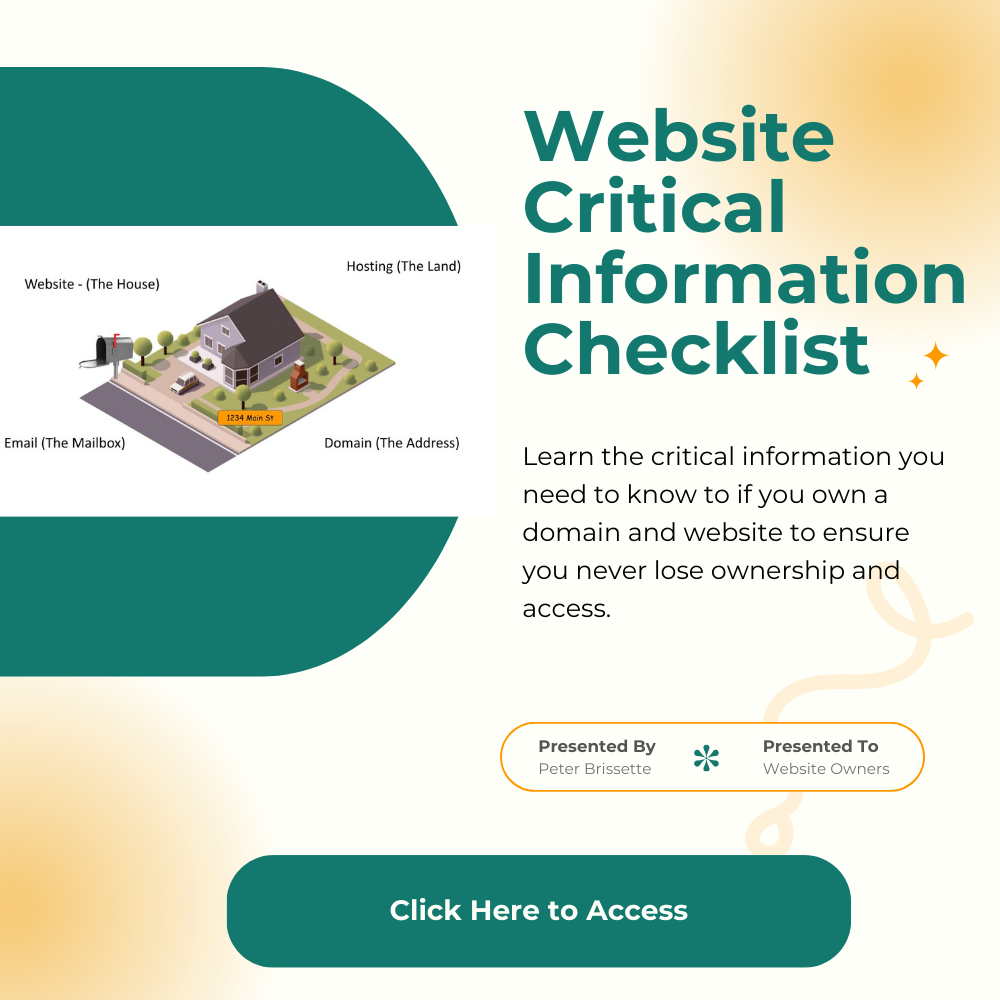
Hey there everybody, Peter Brissette, Digital Marketing Dude. I want to give you an update this month on email and website security, kind of a combination there. One of the things that we’ve noticed over the years is whenever you put an actual email address listed on a website, it usually just gets scraped by spam bots and AI now. And then that email gets used to send you spam. A lot of it can be fairly innocent, but in some cases, you can get a situation like this. Clients started to send me this email that they were getting, and it comes from [email protected] First sign, it’s probably not from us. We send from our dmdude.com email. But they start talking about support and due to one of the vendors that we use for some of our services, which our clients, you know, they don’t know that. So it’s kind of like, what is that? We always do a full SEO setup from the very beginning for all our clients as well, so it’s already been done. There’s nothing else to do anyway. Where they got this email and this information was basically just from the website itself. So we really highly recommend that folks use a form on the website versus just having your email address just sitting on the website, because it can get scraped and used for purposes like that. So we recommend, you know, have a contact form. Contact forms can get spam as well. And so we use, you know, Google’s got a tool for CAPTCHA to help limit the spam that can come in using CAPTCHA. So I’ve got a calendar there to book with, but I also have this basic contact form. It uses the CAPTCHA from Google to help prevent spam from coming in. It still does happen. It doesn’t prevent all of it, but it prevents the majority of it. But if you go through my website, you’re not going to see anywhere where it lists an email address, “Contact us at this email address.” So we recommend just using a form. For our clients, we’re just going to start changing that out and making those changes over time. And then the other thing where we get a lot of spam from as business owners, if you have a business email account, there’s this platform called Apollo that allows marketers to buy access to email lists. So what we recommend, and I’ll put this link in the blog post, is that you go to this link here where it says “Don’t sell my info,” and you can opt out your email address from being in their database. And that will help cut down on the number of spam emails that you might get from that. So to recap, this video is about your email address being actually on your website where it’s visible, or even if it’s a link there that says “click here to email” and then it opens up the email. We don’t recommend that either. We recommend that you use just a form on your website and not have your email address just listed on the website, because AI bots and other tools can scrape that off your website. You wind up in a database like this, and you wind up getting a lot more spam. And it can actually lead to things like this where you’re actually getting fraudulent emails, people trying to actually scam you out of money. So if you have questions about this, just put it in the comments where you see this, and I’m happy to take a look at your own website and make sure that you’ve got the right things in place for email security. Here is the link to Opt Out of Apollo Email Database - Click Here to Opt Out
Video Transcript: All right, hey guys, Peter Brissette here, Digital Marketing Dude, and I wanted to share with you something new about Google reviews that you want to be aware of. So Google now will allow users to update their profile, their name on their profiles, so they can be more anonymous. So they're not entirely anonymous, but if they want to use an initial on their last name or shorten their first name, you know, if it's Jennifer and they just want to put Jen or whatever, Dogmom1234. They can change that on their reviews. So that change here just recently was updated means a couple of things. I just wanted to go through this article real quick and talk about that. So what exactly changed in the review system? So Google now allows any user to set up custom display name and profile image, which will appear on all reviews, photos, videos, and contributions across maps and search. It's also retroactive to all the other reviews that they have left as well. So you don't need to have a different Google account to protect your identity. You can just update your profile information. So in practice, what this should mean is that customers can leave reviews under a nickname instead of their full name. All past, future Google Maps contributions, adopt the pseudonym, applies across Q&A, images, and videos. So Google still knows the account behind the review, only the public name is going to be different. So it should allow, in some industries, folks to be able to leave reviews where maybe in the past they haven't. For example, legal services. So in legal services, can you imagine if you were charged for a crime and your attorney helped you and kept you out of jail or whatever it was, and you went on to post, hey, I got charged with shoplifting. And thankfully, my attorney helped me out. You may not want to put your name on that and have it out there. So things like that, mental health is another big area, various medical or health care practices, a lot of health care practices, I think this could affect. Definitely addiction treatment and recovery, financial advisors, and some sensitive home services. The big question is, does this is, The Increase fake review risk. Most people don't think so. Again, this article is from taprocard.com. They certainly don't think so because it's still a real account. It's not like it's a fake account or something like that. So I think it's still going to produce good reviews, but it should increase the number of reviews. And that's really why this matters for business. You should be able to get more reviews. What you want is more frequent reviews, more recent reviews, and that will help build trust from potential customers. And even with all the AI hype and everything that's going on, it's going to help you with your SEO in maps and search, in particular from phones. So how do businesses adjust the review request strategy? How One thing that can be added when you're requesting reviews is to mention if you'd like extra privacy, Google now allows you to leave reviews under a custom display name. And so that can be something that you add in there. I'm also going to put a link here in the post on how to change your Google display name so that you can see that and be able to offer that for your clients as well. So I just wanted to throw out this quick little update. If you have any questions about this, I want to talk about how your reviews are being managed right now. If you're using our services or someone else and would like to talk about that, please reach out. Thank you again, Peter Brissette, Digital Marketing Dude. Visit our website at dmdude.com. Here is the link to the original Post: https://taprocard.com/blogs/article/google-anonymous-reviews-update-2025 Here is a link that explains how to change your display name on google. https://support.google.com/maps/answer/15294714?hl=en
Facebook Profiles vs. Professional Mode vs. Business Pages: What’s Best for You and Why It Matters
If you're trying to figure out how to make your website more visible on Google, you're not alone. One of the most common questions small business owners ask is: “What should I do to actually get found online?”
How to setup a lead magnet to capture emails on Wix Website with Mailchimp from the best in website design in Westminster, CO
Learn the many benefits of a strong learning system on the backend of a speaking, coaching, consulting business.

Read our latest blog post on Mastering the Marketing A’s: Understanding Your Audience for Better Results.
The last question that should we follow our competitors on social media? Sure, why not. You know, you want to see what they're doing and see what's happening there. You know if you're going to be active and you're really trying to use social to build your business then having a good idea what's what your competition is up to is probably important. And you know sometimes what I find with so called competitors is that we you know often times find people that we can collaborate with. It doesn't necessarily mean they are competitors so we work with a number of other marketing agencies and provides some services for them for their clients that they don't necessarily do, but they hire us to do it for them. So like I work with other marketing agencies, so they're not necessarily, you know, your competitor and everything. So but yeah, see what's going on you know, investigate, read up on them, see what they're doing, check out their websites, see what they're ranking for. You know, the more you understand the competitive landscape, the more you know what you should be doing and what you need to do.
And the last question that we have is, can you say more about running a test on TikTok yeah, I so I'm not on TikTok I'm not using tiktok. I wind up watching a lot of TikTok videos on Facebook and the Facebook reels. I think it's fascinating. I find it very interesting. But it's not a platform that I've taken the time to jump on at this point. Again, based on where I'm at with strategy and so forth, it's not a fit for me. But anytime you're using any platform, if you're going to do something, you want to come up with some means of measurement. How am I going to measure success? What does success look like? Is it I, you know, posted a video and I got a thousand views. Is that success you know or is it actually driving traffic and are you tracking how much traffic and then are you tracking what happened to that traffic? Did they fill out a form, did they make a phone call? Like what's the, where do you want that to go? So we really need to step back and think about that whole process. Of creating content, I'm pushing this through to, you know, to my website. And this is what I want to have happen. This is what I wanted the results to be. And then how am I going to track it? How am I going to measure it and do that so anytime you're spending, anytime you're doing something new in particular. Or you're spending any money you need to track it all the way through. All the way through.
The next question that we have is if you have a GoDaddy web page already and are having some issues, are you able to switch over somehow? You can build your website on any other platform and then just you just change the domain where the domain points. So yeah, you can do that anytime. Thank you, Peter.